With Personalized Nutrients, turning detailed lab test results into fully customized supplement formulas for each patient is now effortless with NutrEval and Metabolomix+ panels from Genova Diagnostics.
Swiftly assess each patient’s unique nutritional needs, and in just a few moments, you can transition from comprehensive lab analysis to ordering targeted, custom supplement formulas, delivered straight to your patient’s door.
No hassle, no delay. Simply link your lab data to the formulation process, and you’ll have precise, patient-specific dietary supplements ready in no time.
Build Data-Driven Personalized Formulations with Genova Test Results
Discover how Genova Diagnostics’ innovative NutrEval and Metabolomix+ panels reduce complex lab data to actionable, personalized recommendations in seconds. Watch one of our healthcare professionals, Meryl Brandwein, demonstrate the full process.

Genova Diagnostics stands out for its thorough, advanced clinical testing in GI, nutrition, endocrine, immunology, and more. Their panels provide deep, actionable insights, so you can offer your patients precision nutraceuticals tailored to their individual metabolic and nutritional profiles.
The Practitioner Portal: Your Gateway to Building Precision Formulas
Learn how to seamlessly transfer your patients’ specific vitamin and mineral requirements through the Genova Diagnostics Practitioner Portal. This streamlined process allows you to send personalized nutritional data directly to Personalized Nutrients while maintaining data security and adding relevant patient notes.
STEP 1: Accessing the Transfer Function
Once you are logged into the practitioner portal, locate the patient profile or the designated area for managing formulations. You will typically find a set of three dots beside every record. Upon clicking that, it opens up a list of more options, indicating a context menu.
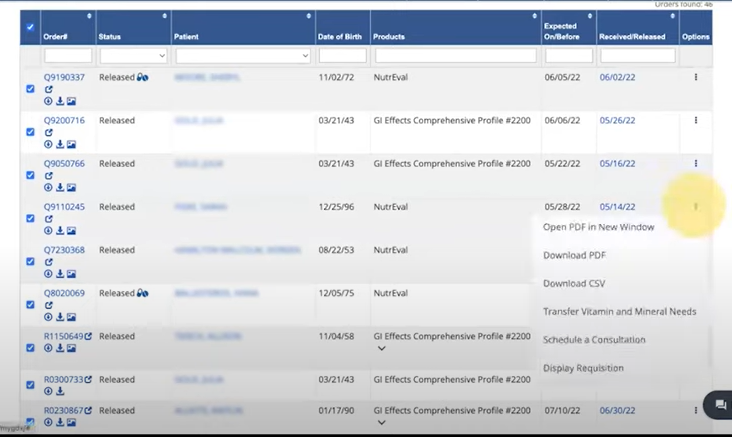
STEP 2: Initiating the Transfer
From the options presented, select “Transfer Vitamin and Mineral Needs“. This action signals the system to prepare for receiving the patient’s specific nutritional data.
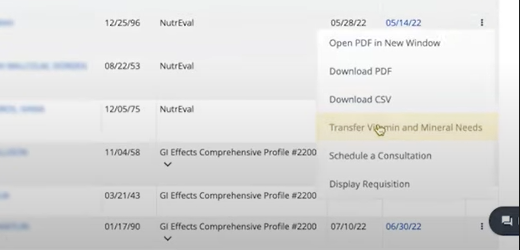
STEP 3: Authorizing the Transfer & Managing Notes
The system will prompt you for authorization to proceed with the data transfer. You will authorize by selecting the checkbox that says “I authorize the transmission of vitamin and minerals needs to a third party provider.”
This ensures data integrity and security.
Additionally, the portal provides a designated section to add notes directly related to the patient’s transfer. You can also send notes separately, depending on your preferred workflow.

STEP 4: Executing the Transfer
With a final confirmation, you will click on “Submit”. The system immediately processes this command, integrating the patient’s vitamin and mineral requirements into their profile. This crucial step signifies the immediate completion of data integration.
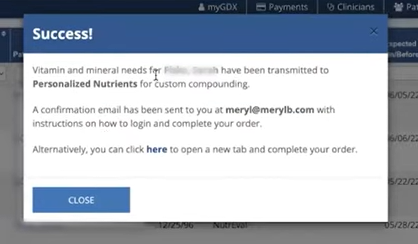
Completing the above process instantly connects the Genova Portal to our API and inserts the formula as a new record in your Personalized Nutrients account. With this, you get a dynamic starting point for your expert adjustments and customizations into the formulation.
Fine-Tune Your Personalized Formulation
Locate and click on the “edit button” associated with the newly added formula.
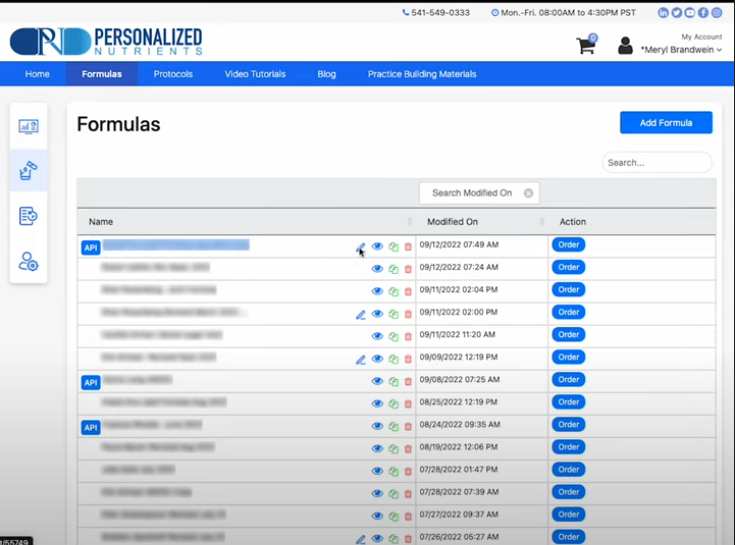
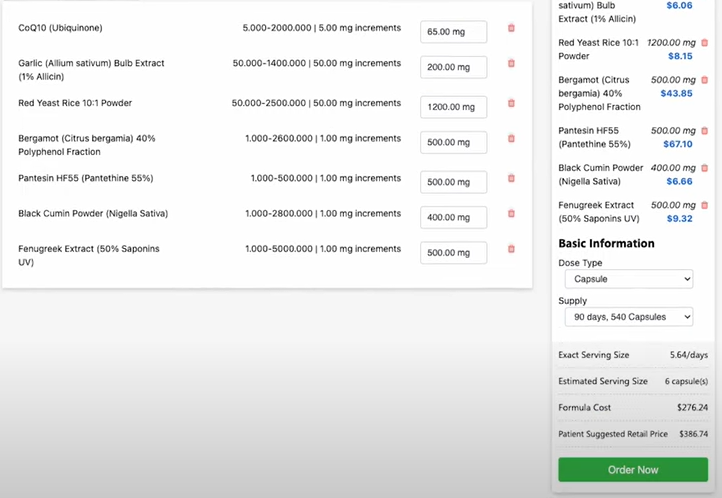
This unlocks the comprehensive customization interface where you can play around with the formulation, modify the blend freely, add or remove ingredients based on new lab results/clinical observations/evolving patient needs, and have complete control of the process.
Adjust dosages and concentrations, ensuring the formula is perfectly aligned with the unique goals of your patient.
Start Building Your Custom Formula with Genova Diagnostics and Personalized Nutrients
With the custom portals from Genova Diagnostics, and the Personalized Nutrients API, you can build truly unique nutraceutical formulations to elevate the level of patient care.